Mounting a desk lamp is a simple DIY project that dramatically improves your workspace. This guide will walk you through choosing the right lamp, gathering tools, and executing a safe, secure installation for optimal lighting. You’ll master the art of how to mount a desk lamp, enhancing both function and style in your home office or study.
A great desk lamp is more than just a light. It’s your partner for late-night projects, your reading companion, and a key piece of your workspace vibe. But a lamp sitting on your desk eats up precious real estate. Learning how to mount a desk lamp frees up that space and gives you perfect, adjustable light exactly where you need it. It might seem like a small project, but doing it right makes all the difference.
This isn’t just about screwing something in. It’s about mastering the art of illumination. A well-mounted lamp banishes eye strain. It highlights your work without creating harsh shadows. It turns a cluttered corner into a focused command center. Whether you’re a student, a remote worker, or a hobbyist, this skill upgrades your setup instantly.
Don’t worry if you’re not a DIY expert. This guide breaks it all down into simple, clear steps. We’ll talk about the different types of mounts, the tools you’ll need, and the little tricks that ensure a secure and stylish installation. Let’s shed some light on the process and get your workspace shining.
Contents
Key Takeaways
- Plan Your Position First: The ideal placement prevents glare and shadows, directly influencing comfort and productivity.
- Match the Mount to Your Surface: Different clamps, grommet bases, and bolt-through methods are suited for specific desk types and thicknesses.
- Gather the Right Tools: A basic toolkit with a drill, screwdrivers, level, and stud finder (for wall mounts) is essential for a professional result.
- Safety is Non-Negotiable: Always secure wiring, avoid over-tightening clamps, and ensure all electrical connections are made with the power off.
- Test Before Finalizing: Check the lamp’s full range of motion and switch function after mounting to make any needed adjustments.
- Cable Management is Key: Neatly routing and securing the power cord prevents tangles and creates a clean, professional look.
📑 Table of Contents
1. Pre-Installation: Planning and Preparation
Jumping straight in with a drill is a recipe for mistakes. The first step in mastering how to mount a desk lamp happens long before you pick up a tool. It’s all about smart planning.
Choosing the Perfect Spot
Where you put the light is crucial. The golden rule for task lighting is to position the light source opposite your writing hand. This prevents your hand from casting a shadow on your work. For most right-handed people, this means the light should come from the left side. Lefties should mount it on the right.
Think about what you’ll be lighting. Is it a computer monitor? You want to avoid glare on the screen. Position the lamp so its light shines onto the desk surface, not directly at the monitor. For reading or detailed craft work, the lamp should be closer and more direct. Sit in your chair and mimic your work. Hold the lamp (or even a flashlight) in different spots to find the sweet spot.
Selecting Your Mounting Method
Not all lamps mount the same way. And not all desks can handle every mount. Here are the main types:
- Clamp Mount: This is the most common and versatile. A clamp attaches to the edge of your desk. It’s great for most desks, but check your desk’s thickness. Clamps have a maximum opening.
- Grommet Mount: This base fits into a pre-existing cable hole (a grommet) in your desk. It’s very stable and looks clean, but you need that hole in the right place.
- Bolt-Through Mount: This involves drilling a hole through the desk and securing the lamp with a bolt and nut. It’s the most permanent and stable option, best for heavy lamps.
- Wall Mount: Some lamps are designed to be mounted on the wall or a panel behind the desk. This frees up the entire desk surface.
Look at your lamp’s base and your desk. Choose the method that fits both.
Gathering Your Tools and Supplies
Being prepared saves time and frustration. Here’s a basic toolkit for most mounting jobs:
- Power drill with assorted bits (for pilot holes or bolt-through mounts)
- Screwdrivers (both flathead and Phillips)
- Adjustable wrench or set of sockets
- Measuring tape
- Pencil for marking
- Level (a small one is perfect)
- Stud finder (if you’re mounting on a wall)
- Cable management clips or adhesive-backed cord channels
Lay everything out before you start. Read the lamp’s manual, too. It often has specific instructions.
2. Step-by-Step Mounting Guide
Now for the main event. Follow these steps carefully for a safe and secure installation.
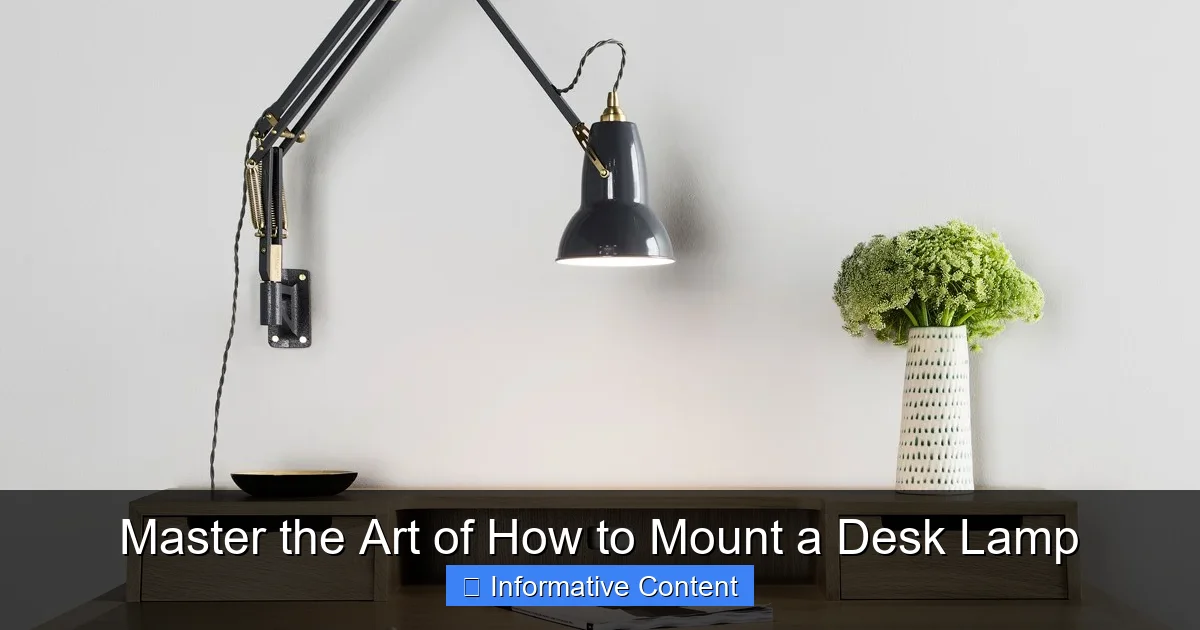
Visual guide about Master the Art of How to Mount a Desk Lamp
Image source: dm4c9mjc2jvtf.cloudfront.net
Step 1: Mark and Measure
Use your pencil to lightly mark the exact spot where the mount will go. If using a clamp, mark where the jaws will sit. Use your level to make sure any marks for the base are straight. This is your last chance to adjust the position without any holes!
Step 2: Prepare the Mounting Area
For a clamp mount, check the area for cables or uneven edges. You might place a small piece of felt or rubber from the hardware store between the clamp and your desk finish to prevent scratches. For a bolt-through mount, you’ll need to drill a pilot hole at your marked spot. Choose a drill bit slightly smaller than your bolt.
Step 3: Assemble and Secure the Base
Follow your lamp’s instructions to attach the mounting hardware to the lamp’s arm or stem. Then, position the base on the desk.
- For Clamps: Open the clamp, position it on the desk edge, and tighten the screw firmly. Do not overtighten, as this can damage the desk or the clamp. It should be snug and not wobble.
- For Grommet/Bolt-Through: Insert the base through the hole. Under the desk, attach the provided washer and nut. Tighten with your wrench until the base is firmly in place and doesn’t spin.
- For Wall Mounts: Use the stud finder to locate a wall stud. Mark the screw holes on the stud. Drill pilot holes, then use the provided screws to attach the mounting bracket securely to the wall.
Step 4: Attach the Lamp and Arm
Once the base is rock-solid, you can attach the main lamp arm or gooseneck. This usually involves threading it into the base or securing it with a set screw. Tighten all connections, but be gentle with adjustable joints—you don’t want to strip them.
Step 5: Manage the Cable
A mounted lamp with a dangling cord looks messy and is a safety hazard. Route the power cord neatly down the lamp arm. Use small zip ties or adhesive cable clips to secure it to the arm. Then, run the cord along the back leg of your desk or use a cord channel to guide it to the outlet. This clean look is the hallmark of a pro job.
3. Safety Checks and Final Adjustments
You’re almost done! Don’t skip this crucial verification stage.
Visual guide about Master the Art of How to Mount a Desk Lamp
Image source: pics.clipartpng.com
The Stability Test
Gently try to wobble the lamp at its base and along the arm. There should be no looseness at the mounting point. If there is, check and tighten the connections. For a clamp, you may need to add a thin shim for a better grip.
The Motion and Function Test
Move the lamp through its full range of motion. Adjust the arm, swivel the head, and position it for different tasks. It should hold its position without sagging. Now, plug it in and test the switch. Make sure all lighting functions (like dimming or color temperature changes) work correctly.
Final Lighting Check
Sit in your chair and turn the lamp on. Do the actual work you’ll be doing. Is there glare on your screen? Are there shadows on your notebook? Now is the time to tweak the arm and head angle until the light is perfect. This personalized adjustment is the final step in mastering how to mount a desk lamp.
4. Troubleshooting Common Issues
Even with careful planning, small issues can pop up. Here’s how to fix them.
Visual guide about Master the Art of How to Mount a Desk Lamp
Image source: static.vecteezy.com
Lamp is Wobbly or Sagging
This usually means a connection isn’t tight enough. Check every joint and set screw along the arm. For clamp mounts, the desk edge might be too thick or too thin for the clamp to get a good grip. A rubber pad can help fill a gap on a thin edge.
Clamp is Scratching or Damaging the Desk
You should have used a protective pad. If you didn’t, un-mount the lamp and add one. Felt pads, rubber sheets, or even a few layers of electrical tape on the clamp jaws can protect your desk’s finish.
Lamp Doesn’t Reach the Desired Area
This is a planning issue. You may need a lamp with a longer arm or a different mounting position. Before remounting, consider if a wall mount from a farther point would give you better coverage.
Excess Cord is Visible
Go back to your cable management. Use more clips to secure the cord tightly along the arm and desk leg. For a truly clean look, a desk with a built-in cable management tray or a simple adhesive cord raceway can hide the wire completely.
5. Creative Mounting Ideas and Advanced Tips
Once you’ve mastered the basics, you can get creative with your setup.
Dual Lamp Setups
For a large desk, consider mounting two smaller lamps—one on each side. This provides incredibly even, shadow-free light across the entire workspace. Just make sure their light beams don’t clash in the middle.
Mounting on Non-Standard Surfaces
You can mount a lamp on a bookshelf next to your desk, on a partition wall, or even on the side of a filing cabinet. The principles are the same: ensure the surface is sturdy and use the correct hardware. For metal surfaces, you might need self-tapping screws or strong magnets designed for mounting.
Integrating with Smart Home Systems
Many modern lamps are smart. When learning how to mount a desk lamp like this, think about cable management for any extra hubs and plan for easy voice or app control. Mount it in a spot that’s convenient for both lighting and tech integration.
Conclusion
Mounting a desk lamp is a simple yet transformative DIY skill. It declutters your space and puts you in complete control of your light. You’ve learned that success starts with planning the perfect position and choosing the right mount for your desk. The step-by-step process, from marking to cable management, ensures a safe and sturdy result.
Remember, the goal isn’t just to attach a lamp. It’s to master the art of creating a perfectly lit, highly functional workspace. The few hours you spend doing this will pay off every single day in reduced eye strain and increased focus. So, grab your tools, pick your spot, and take the plunge. Your new, brighter, and more organized desk awaits.
Frequently Asked Questions
Can I mount any desk lamp?
Not all lamps are designed to be mounted. You need a lamp that specifically comes with a clamp, grommet, or bolt-through base. A lamp meant to sit on a flat base cannot be safely mounted without specialized modification, which is not recommended.
How do I mount a lamp on a glass desk?
You must be very careful. Use a clamp mount with wide, padded jaws specifically designed for glass to distribute pressure evenly. Avoid overtightening. Bolt-through mounts are generally not suitable for glass unless it is tempered and you use a professional glass drilling service.
What if my desk is too thick for the clamp?
Check the clamp’s maximum opening specification. If your desk is thicker, you will need to purchase a different clamp with a wider reach or consider a different mounting method, like a grommet or wall mount.
Is it safe to drill into my desk?
Yes, if you do it correctly. Always check what’s underneath the drill point. Use a pilot hole and the correct size bit for a clean finish. This is a permanent modification, so be certain of your placement before drilling.
How high should a mounted desk lamp be?
A good starting point is to have the bottom of the lampshade about 15-20 inches above the desk surface. The key is that the light should illuminate your work without the bulb being in your direct line of sight, which causes glare.
Can I mount a heavy architect’s lamp?
Yes, but stability is critical. For heavy lamps, a bolt-through mount is the most secure option. A sturdy clamp can also work, but ensure your desk edge is solid wood, not hollow, and that the clamp is rated for the weight.