
Getting your office lighting right is essential for focus and long-term eye health. Most experts agree that 500 lux is the ideal brightness level for a productive workspace. By balancing task lighting with ambient light, you can create an environment that keeps you alert without causing headaches or fatigue.
Have you ever finished a long day at your desk feeling like your eyes were filled with sand? Or perhaps you found yourself nodding off at 2:00 PM despite having a full night of sleep? Often, the culprit is not your workload or your bed. It is your lighting. Understanding how bright should work desk lighting be is the secret to unlocking a new level of daily productivity.
In this guide, you will learn exactly how to measure light. We will cover the difference between lumens and lux. We will also explore how the color of your light affects your brain. By the end, you will have a step-by-step plan to transform your desk into a professional-grade workspace.
Contents
- 1 Key Takeaways
- 2 Step 1: Understand the Difference Between Lumens and Lux
- 3 Step 2: Calculate Your Specific Brightness Needs
- 4 Step 3: Choose the Right Color Temperature
- 5 Step 4: Layer Your Light Sources
- 6 Step 5: Position Your Lights to Avoid Glare
- 7 Practical Tips for a Better Workspace
- 8 Troubleshooting Common Lighting Problems
- 9 Conclusion
- 10 Author
Key Takeaways
- Target 500 Lux: This is the standard measurement for office work, providing enough light for reading and writing without being overwhelming.
- Layer Your Lighting: Combine overhead ambient lights with dedicated desk lamps to eliminate harsh shadows and dark corners.
- Choose 4000K to 5000K: This color temperature range mimics daylight, which helps maintain focus and keeps your energy levels high.
- Minimize Glare: Position your light sources to avoid reflections on computer screens, which is a leading cause of digital eye strain.
- Adjust for Age: Older eyes often require significantly more light (up to double) to perform the same tasks comfortably as younger eyes.
- Use LED Bulbs: Modern LEDs allow you to adjust both brightness and color temperature, making them the most versatile choice for home offices.
Step 1: Understand the Difference Between Lumens and Lux
Before you buy a new lamp, you need to speak the language of light. Many people make the mistake of looking at watts. However, watts only tell you how much electricity a bulb uses. They do not tell you how bright the light is.
The Role of Lumens
Lumens measure the total amount of light emitted by a bulb. Think of lumens as the “output.” If a bulb has a high lumen count, it is very bright at the source. For a standard desk lamp, you usually want a bulb that produces between 450 and 800 lumens. This is roughly equivalent to a 40-watt to 60-watt old-fashioned incandescent bulb.
The Importance of Lux
Lux is where things get interesting for your productivity. Lux measures how much light actually hits your desk surface. One lux is equal to one lumen per square meter. This is vital because a bright bulb (high lumens) placed ten feet away will provide very little light (low lux) on your paperwork. For professional office work, the industry standard is 500 lux. If you are doing very detailed work like drawing or sewing, you might even want up to 1,000 lux.
Step 2: Calculate Your Specific Brightness Needs
Every desk is different. A small laptop stand in a sunny corner needs different lighting than a large mahogany desk in a windowless basement. To figure out how bright should work desk lighting be for your specific setup, you can use a simple formula.
Visual guide about How Bright Should Work Desk Lighting Be for Productivity
Image source: stunningmotivation.com
Measure Your Surface Area
Start by measuring the area of your desk where you actually work. If your desk is 1.5 meters long and 0.5 meters wide, your surface area is 0.75 square meters. To reach the 500 lux goal, you multiply 500 by 0.75. This means you need about 375 lumens hitting that specific surface area.
Account for Distance
Remember that light loses intensity as it travels. If your lamp is high above your head, you will need a higher-lumen bulb to ensure 500 lux reaches the desk. Most adjustable desk lamps allow you to bring the light closer. This lets you get more “lux” out of a “low-lumen” bulb. It is a great way to save energy while keeping your workspace bright.
Step 3: Choose the Right Color Temperature
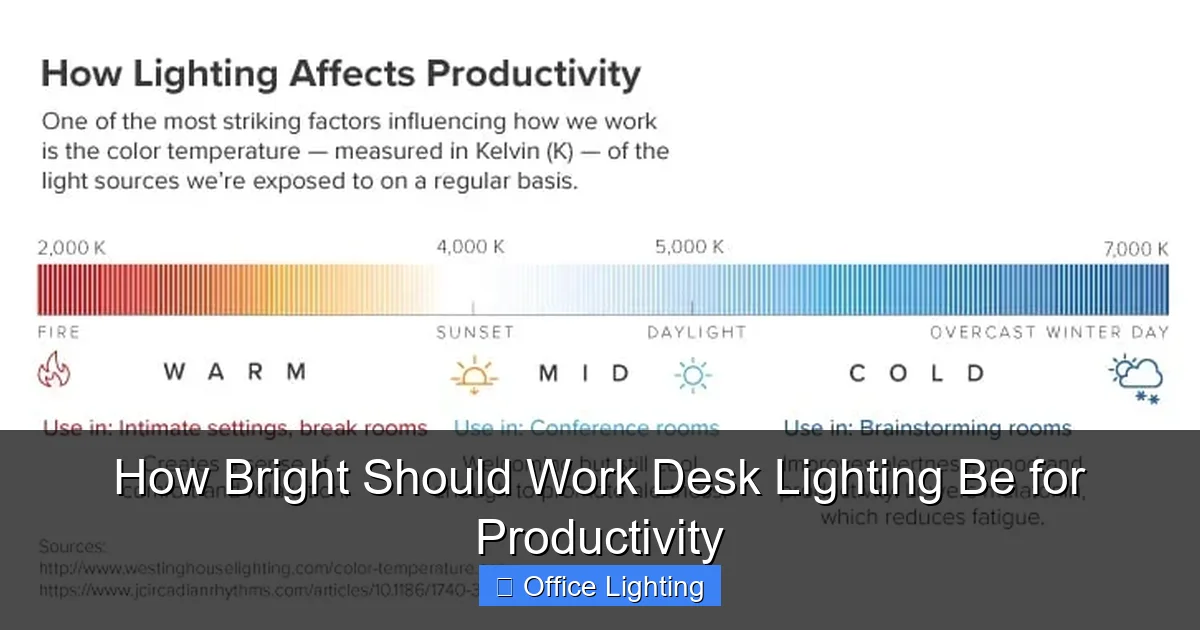
Brightness is only half of the story. The color of the light—measured in Kelvins (K)—dictates how your brain responds to the environment. Light can either make you feel relaxed or make you feel alert.

Visual guide about How Bright Should Work Desk Lighting Be for Productivity
Image source: quickandeasylighting.com
Warm Light (2700K – 3000K)
Warm light has a yellow or orange tint. It is wonderful for living rooms and bedrooms because it helps your body produce melatonin. However, it is usually too relaxing for a work environment. If your desk light is too warm, you might find yourself feeling sluggish and unmotivated.
Cool White Light (4000K – 5000K)
This is the “sweet spot” for productivity. This range mimics the crisp white light of a clear morning. It helps suppress melatonin and encourages the production of cortisol, which keeps you awake and focused. When asking how bright should work desk lighting be, always ensure the color temperature is in this “cool white” range to maximize the effect.
Daylight (6000K and above)
Some people prefer very blue “daylight” bulbs. These can be helpful for high-contrast tasks or color-accurate work like graphic design. However, for many people, this can feel “sterile” or “harsh.” It may also interfere with your sleep if you work late into the evening.
Step 4: Layer Your Light Sources
Relying on a single lamp is a recipe for eye strain. When one spot is very bright and the rest of the room is dark, your pupils have to constantly adjust. This wears out the tiny muscles in your eyes. This is why layering is essential.
Ambient Lighting
This is your “base” layer. It usually comes from overhead fixtures or large floor lamps. Ambient light should be soft and fill the whole room. It prevents your desk lamp from creating a “spotlight” effect that strains the eyes.
Task Lighting
This is your focused light. Your desk lamp provides task lighting. This is where you apply the 500 lux rule. This light should be directed specifically at your documents or keyboard. If you can, choose a lamp with an adjustable arm so you can move it as the sun changes throughout the day.
Accent Lighting
This is optional but helpful. It can include LED strips behind your monitor (bias lighting). Bias lighting reduces the contrast between your bright screen and the dark wall behind it. This is a great trick for people who work on computers for 8+ hours a day.
Step 5: Position Your Lights to Avoid Glare
Even the perfect brightness will fail you if it causes glare. Glare happens when light reflects off your monitor or a glossy desk surface directly into your eyes. This forces your brain to work harder to “see through” the reflection.
The Side-Placement Rule
Place your task lamp on the opposite side of your dominant hand. If you are right-handed, place the lamp on the left side of the desk. This prevents your hand from casting shadows over your work as you write. More importantly, it helps angle the light so reflections bounce away from your eyes rather than toward them.
Adjusting Your Monitor
Position your screen so it is perpendicular to windows. Never face a window directly, as the bright sun will cause a silhouette effect. Likewise, never have a window directly behind you, as it will create a massive reflection on your screen. If you cannot move your desk, use “blackout” or “light-filtering” shades to control the natural light.
Practical Tips for a Better Workspace
- Use Dimmer Switches: Your needs change. At 10:00 AM, you might need less light. At 4:00 PM on a rainy Tuesday, you might need maximum brightness. Dimmers give you total control.
- Consider Your Age: As we get older, the lenses in our eyes become less transparent. A person in their 60s typically needs three times as much light as a person in their 20s to see clearly.
- Clean Your Bulbs: Dust can reduce a bulb’s light output by up to 20%. Wipe your lamps and bulbs (when they are cool!) once a month.
- Go for High CRI: Look for bulbs with a Color Rendering Index (CRI) of 90 or higher. This ensures that colors look natural and vibrant, which reduces the mental “fog” of working under poor quality light.
Troubleshooting Common Lighting Problems
Sometimes you might follow all the rules and still feel uncomfortable. Here are a few common issues and how to fix them.
Problem: Headaches after a few hours
The Fix: Check for flickering. Some cheap LED bulbs or older fluorescent tubes flicker at a rate the eye can’t see but the brain can process. Replace the bulb with a “flicker-free” LED. Also, ensure your ambient light is bright enough so the contrast isn’t too high.
Problem: Screens look “washed out”
The Fix: Your light is likely too bright or hitting the screen directly. Move your task lamp further away or angle the head downward. You want the light on the desk, not on the glass of the monitor.
Problem: Feeling “wired” at bedtime
The Fix: You are likely using high-Kelvin (cool) light too late. If you work at night, switch to a warmer bulb or use a smart bulb that changes color temperature automatically as the sun goes down. This protects your circadian rhythm.
Conclusion
So, how bright should work desk lighting be? The answer is a balance of science and personal comfort. By aiming for 500 lux on your work surface and choosing a 4000K-5000K color temperature, you create a foundation for peak performance.
Remember that lighting is not a “set it and forget it” task. As the seasons change and as you age, your needs will evolve. Pay attention to how your eyes feel at the end of the day. If you feel tired, adjust your brightness. With the right light, you won’t just see your work better—you will do your work better. Spend a few minutes today adjusting your lamps. Your future, more productive self will thank you.